

A paint coverage calculator can answer two important questions: how much paint is required for a known surface area, and how much area an available quantity of paint can cover. The calculation considers surface area or paint quantity, the number of coats, product coverage rate, waste allowance and, when required, the selected container size.
The result is a planning estimate. Actual coverage can change with the paint product, surface texture, porosity, preparation, application method and color change. Always use the coverage rate printed on the paint label or technical data sheet.
Choose What You Want to Calculate
The calculator provides two calculation modes:
- Paint needed: Use this mode when you know the paintable surface area and want to estimate the required paint quantity and number of containers.
- Coverage area: Use this mode when you already have paint and want to estimate how much surface area it can cover.
Select the mode that matches the information you already have. The input fields and final results will change according to your selection.
How to Calculate the Paint Needed
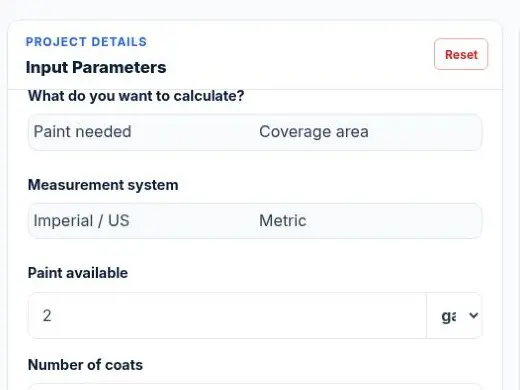
Select Paint needed when you have measured the surface but do not know how much paint to buy.
Step 1: Select the Measurement System
Choose Imperial / US or Metric.
- Imperial / US mode uses square feet, gallons and quarts.
- Metric mode uses square meters and liters.
Use one measurement system throughout the calculation. Do not enter an area measured in square meters with a coverage rate stated in square feet per gallon.
Step 2: Enter the Paintable Surface Area
Enter the total area that will receive paint. In Imperial / US mode, this is normally entered in square feet. In Metric mode, it is entered in square meters.
If you still need to measure the project, calculate the area of each wall, ceiling or other rectangular surface:
Surface area = Length × Height
Add the areas of all surfaces that will receive the same paint. Subtract doors, windows or other unpainted openings when they are large enough to affect the estimate.
The Paint Coverage Calculator does not measure the room or subtract openings automatically. For a room-based estimate using wall dimensions, openings and ceilings, use the related Paint Calculator.
Step 3: Enter the Number of Coats
Enter the number of complete coats planned for the surface. One coat covers the surface once, while two coats cover the same area twice.
Adding another coat increases the paint requirement. For example, applying two coats to 500 square feet creates a coat-adjusted area of 1,000 square feet.
Do not count primer as finish paint unless you are deliberately calculating primer with its own coverage rate. Primer and finish paint can have different spread rates and should normally be calculated separately.
Step 4: Enter the Coverage Rate per Coat
Enter the coverage or spread rate stated by the paint manufacturer. Imperial / US mode supports square feet per gallon, while Metric mode supports square meters per liter.
Many wall paints may list coverage near 350 to 400 square feet per gallon, but this is not a universal value. Specialty coatings, primers, masonry paints and paints applied to rough or porous surfaces can have different rates.
Use the selected product’s own label or technical data sheet instead of relying on a general default.
Step 5: Add a Waste Allowance
Enter a percentage for expected application losses. Waste can include paint left in containers, trays, rollers, brushes or spray equipment, along with minor spills and touch-ups.
The appropriate allowance depends on the surface and application method. Smooth, sealed surfaces may have lower losses than rough, porous or heavily textured surfaces. Spraying can also produce different losses from brushing or rolling.
The calculator adds the selected waste allowance to the base paint requirement. Do not increase the surface area manually to account for waste if you are already using this field.
Step 6: Select the Purchase Container Size
Select the container size you plan to buy. Available sizes depend on the selected measurement system. Imperial / US options include gallon and quart-based containers, while Metric mode uses liter-based containers.
The calculator divides the required paint by the selected container size and rounds the result up to a complete container. Paint cannot normally be purchased as a fraction of a sealed container.
A different combination of available container sizes may reduce leftover paint. Compare the calculator’s result with the sizes sold by your chosen supplier.
Step 7: Calculate and Review the Result
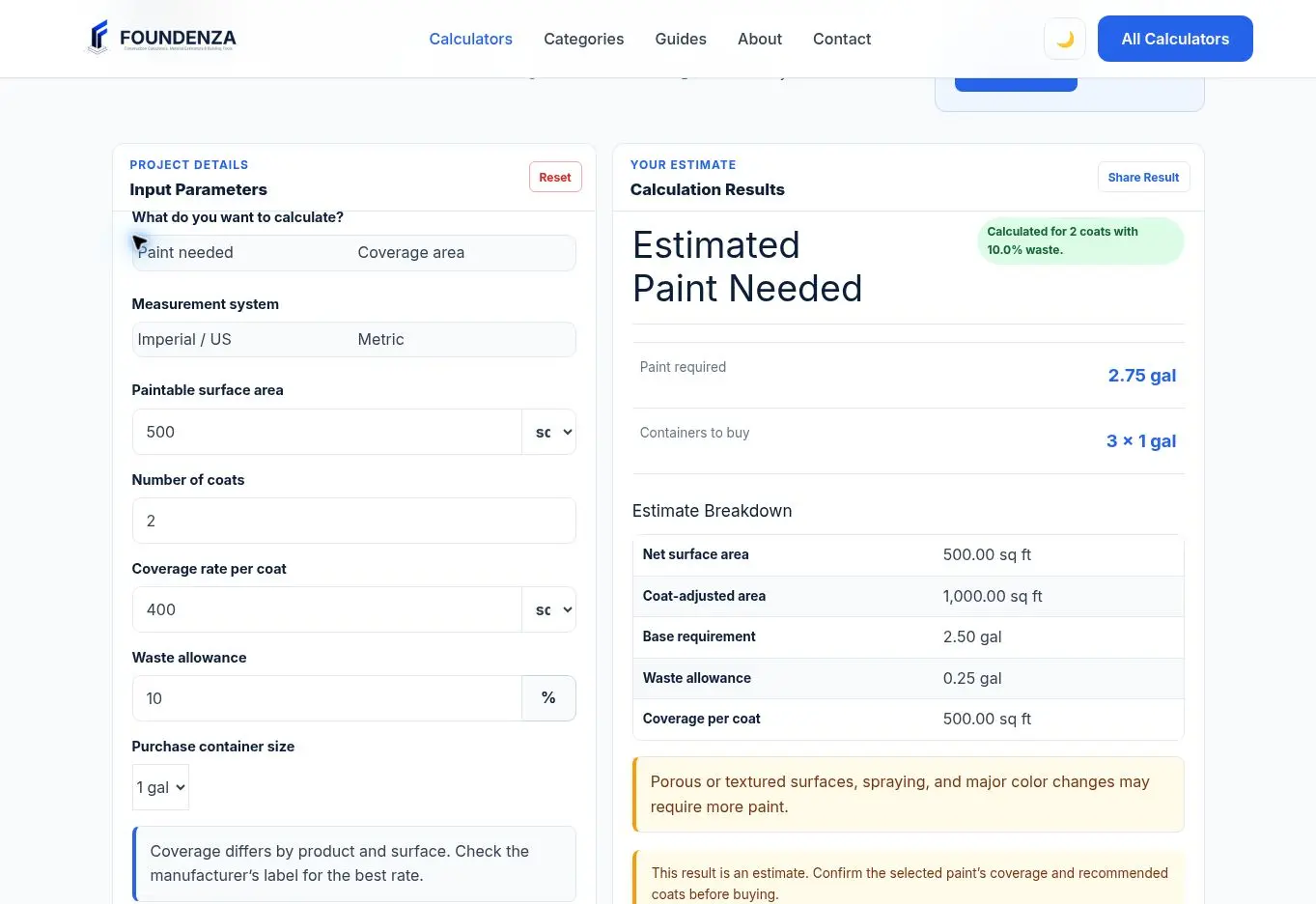
Select Calculate Coverage. The result panel displays the estimated paint required, containers to buy and a calculation breakdown.
Review the following values:
- Paint required: Estimated paint quantity after accounting for coats and waste.
- Containers to buy: Complete containers required in the selected size.
- Net surface area: Surface area entered for the project.
- Coat-adjusted area: Surface area multiplied by the number of coats.
- Base requirement: Paint quantity before adding waste.
- Waste allowance: Additional paint included for the selected loss percentage.
Paint Needed Formula
The calculator first adjusts the surface area for the number of coats:
Coat-adjusted area = Paintable surface area × Number of coats
It then divides the coat-adjusted area by the product coverage rate:
Base paint requirement = Coat-adjusted area ÷ Coverage rate
The selected waste allowance is then added:
Total paint required = Base paint requirement × (1 + Waste percentage ÷ 100)
Finally, the required paint is divided by the selected container size:
Containers required = Total paint required ÷ Container size
The container result is rounded up to the next complete container.
Paint Needed Calculation Example
Suppose a project has 500 square feet of paintable surface. The planned finish requires two coats, the paint covers 400 square feet per gallon and a 10% waste allowance is selected.
- Paintable surface area: 500 sq ft
- Number of coats: 2
- Coverage rate: 400 sq ft/gal
- Waste allowance: 10%
- Container size: 1 gal
Coat-adjusted area:
500 × 2 = 1,000 sq ft
Base paint requirement:
1,000 ÷ 400 = 2.5 gal
Paint required after waste:
2.5 × 1.10 = 2.75 gal
Containers required:
2.75 ÷ 1 = 2.75 containers
The purchase quantity is rounded up to three 1-gallon containers.
How to Calculate the Coverage Area
Select Coverage area when you know how much paint is available and want to determine how much surface it can cover.
Step 1: Select the Measurement System
Choose Imperial / US or Metric. Match the paint-quantity unit with the coverage-rate unit.
- Gallons or quarts should be used with square feet per gallon.
- Liters should be used with square meters per liter.
Step 2: Enter the Paint Available
Enter the total quantity of the same paint product that is available for the project. Do not combine products with different coverage rates unless you calculate them separately.
If paint is entered in quarts, the calculator converts the quantity into the appropriate base unit for the calculation.
Step 3: Enter the Number of Coats
Enter the number of complete coats required. As the number of coats increases, the final surface area that can be completed becomes smaller.
Two coats do not double the coverage area. They require the same surface to be covered twice, so the available paint covers about half as much project area as it would with one coat.
Step 4: Enter the Coverage Rate
Use the manufacturer’s coverage rate for the exact paint product and surface type. The rate represents how much area one unit of paint can theoretically cover with one coat.
Step 5: Enter the Waste Allowance
In Coverage area mode, the available paint includes both the estimated application quantity and its waste allowance. The calculator removes the waste portion by dividing the available quantity by the waste factor.
This method is the reverse of adding waste in Paint needed mode. For example, when the waste allowance is 10%, the available paint is divided by 1.10 to estimate the base quantity that can be applied to the measured surface.
Step 6: Calculate the Coverage Area
Select Calculate Coverage. The calculator displays the estimated surface area that can receive the selected number of complete coats.
The result helps you compare the available paint with the measured project area. It does not measure walls, ceilings, trim or openings automatically.
Coverage Area Formula
The calculator first removes the waste portion from the available paint by dividing by the waste factor:
Base usable paint = Paint available ÷ (1 + Waste percentage ÷ 100)
It then multiplies the base usable paint by the entered product coverage rate:
One-coat coverage = Base usable paint × Coverage rate
Finally, it divides the one-coat coverage by the number of coats:
Final project coverage = One-coat coverage ÷ Number of coats
The equivalent combined formula is:
Final coverage area = Paint available ÷ (1 + Waste percentage ÷ 100) × Coverage rate ÷ Number of coats
Coverage Area Calculation Example
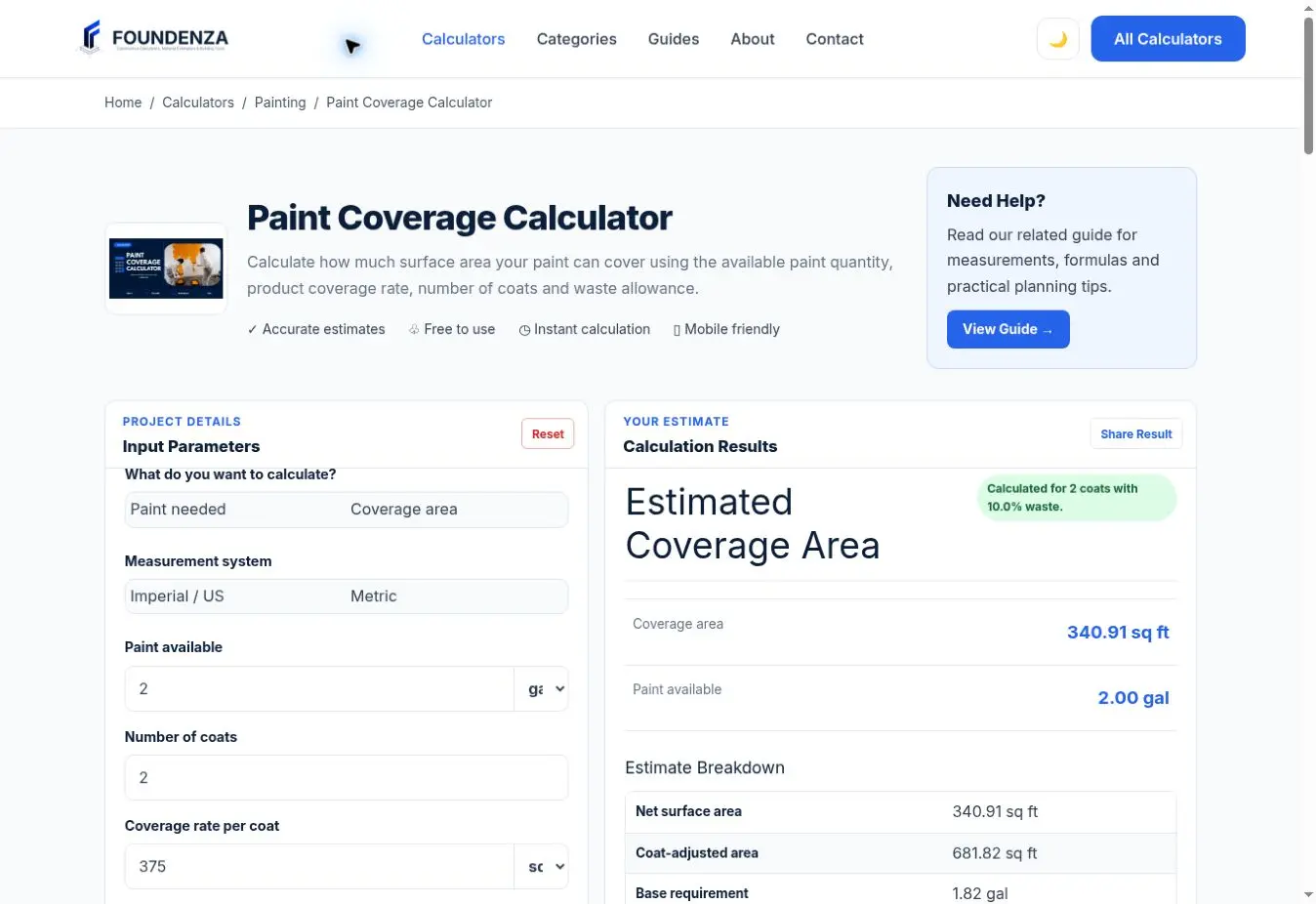
Suppose you have 2 gallons of paint. The product covers 375 square feet per gallon, the surface requires two coats and you select a 10% waste allowance.
- Paint available: 2 gal
- Coverage rate: 375 sq ft/gal
- Number of coats: 2
- Waste allowance: 10%
Base usable paint:
2 ÷ 1.10 ≈ 1.82 gal
One-coat coverage:
1.8182 × 375 ≈ 681.82 sq ft
Final two-coat coverage:
681.82 ÷ 2 ≈ 340.91 sq ft
Under these assumptions, the available paint can cover approximately 340.91 square feet with two complete coats.
Metric Paint Coverage Example
Suppose you have 10 liters of paint with a coverage rate of 12 square meters per liter. The surface requires two coats and the selected waste allowance is 10%.
Base usable paint:
10 ÷ 1.10 ≈ 9.09 L
One-coat coverage:
9.0909 × 12 ≈ 109.09 m²
Final two-coat coverage:
109.09 ÷ 2 ≈ 54.55 m²
The available paint can cover approximately 54.55 square meters with two complete coats.
Common Paint Coverage Mistakes
- Using a general coverage rate: Check the selected product instead of assuming every paint has the same spread rate.
- Forgetting additional coats: Each full coat covers the same surface again and requires more paint.
- Mixing measurement systems: Keep surface area, paint quantity and coverage rate in compatible units.
- Adding waste twice: Do not enlarge the area or paint quantity manually when using the calculator’s waste field.
- Including primer as finish paint: Calculate primer separately using its own coverage rate.
- Rounding containers down: Purchase quantities must be rounded up to complete containers.
- Ignoring surface condition: Rough, porous or unsealed surfaces may use more paint than a smooth, prepared surface.
Why Actual Coverage May Be Different
A calculator can only estimate coverage from the values entered. Actual paint use can change because of:
- Surface texture and porosity
- Previous and new colors
- Surface preparation
- Application by brush, roller or sprayer
- Required film thickness
- Paint left in tools and containers
- Minor spills and touch-ups
- Weather and surface conditions for exterior work
Check the manufacturer’s instructions for the recommended preparation, application rate, number of coats and drying conditions.
What the Calculator Does Not Estimate
The Paint Coverage Calculator does not separately calculate room dimensions, doors, windows, ceilings, trim, primer, labor, tools or total project cost. It also does not confirm that the available paint is suitable for a particular surface.
Use the result as a material-planning estimate and compare it with the measured project area, product instructions and available container sizes before purchasing paint.
Final Check Before Buying or Painting
Confirm the paintable area, measurement system, number of coats, product coverage rate, waste allowance and container size. If you are using Coverage area mode, compare the calculated coverage with the actual measured surface.
When possible, purchase enough paint from the same product and color batch to complete the project. Keep a small amount for later touch-ups, especially when an exact color match may be difficult to obtain.